Can I import contacts that only have a phone number?
Yes. You can import contacts with a phone number and no email by CSV. You can only send AlimTalk to these contacts.
How to import
- Go to Customers → Leads and click CSV Import.
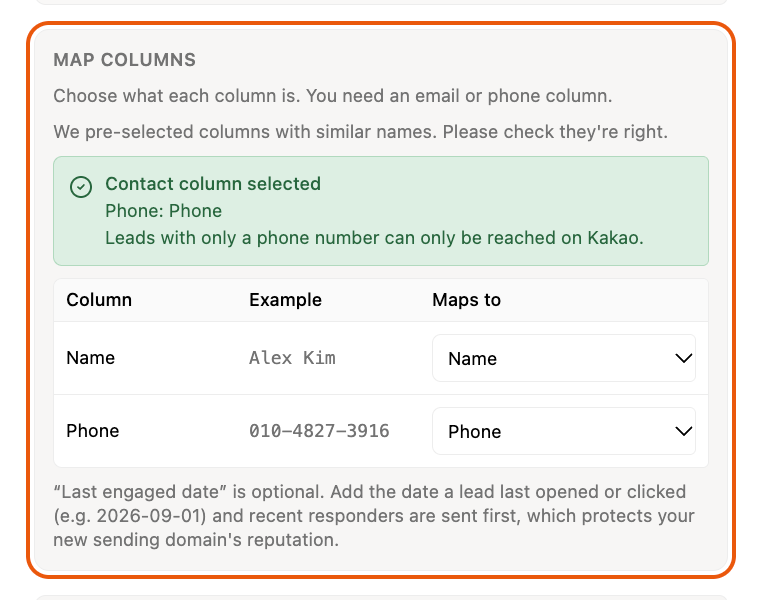
- Map the phone number column to Phone. You don't need an email column.
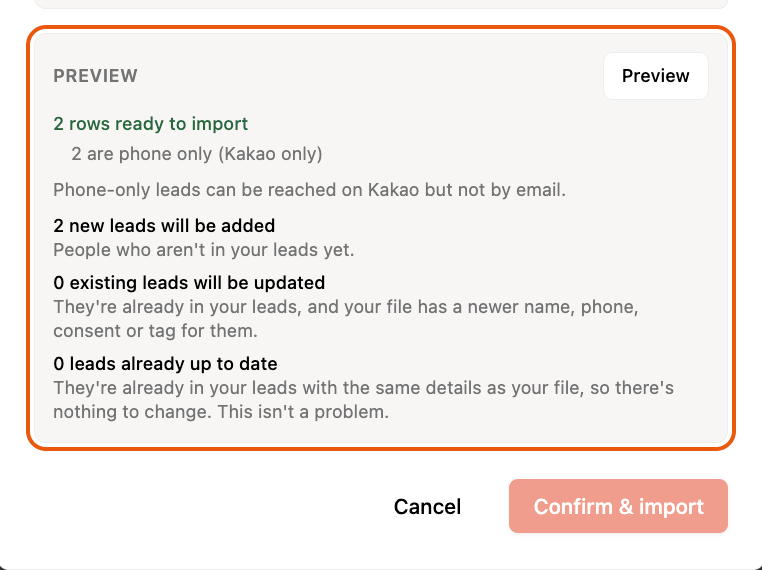
- Click Preview to see how many rows can be imported and how many have only a phone number.
- Check the confirmation box under Consent, then click Confirm & import.
Good to know
- You can send AlimTalk to phone-only contacts, but not email.
- Numbers that start with 10 because Excel dropped the leading 0 are imported too.
- Rows that only have a landline, an international number, or a number with repeating or sequential digits are skipped.
- You can see why rows were skipped under rows that couldn't be imported in the preview.
Still need help?
Tell us what you need help with and which screen you are using.